

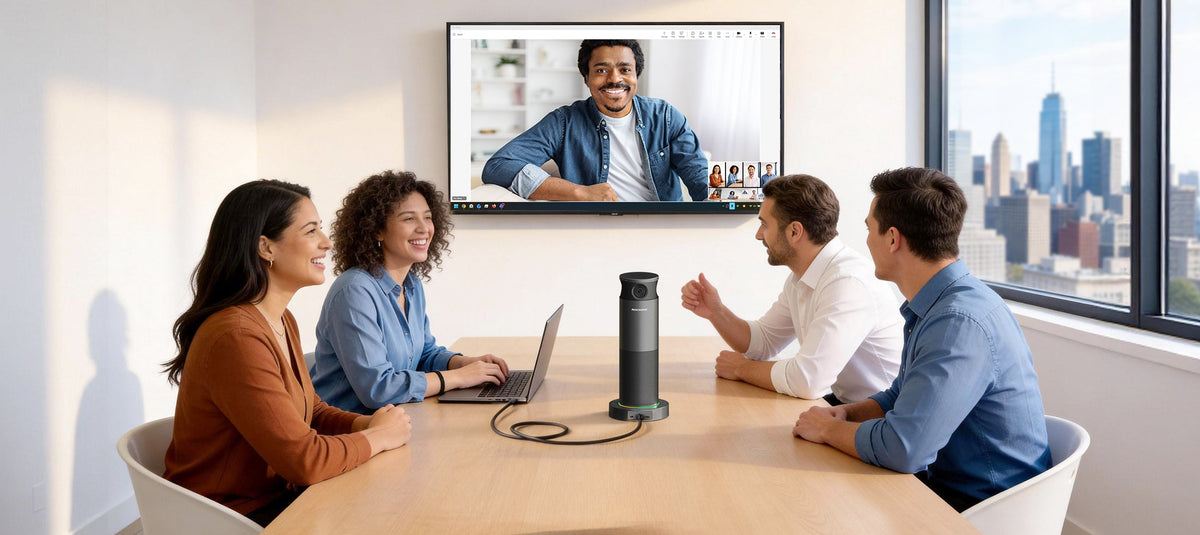
BYOM, or Bring Your Own Meeting, allows users to host video meetings from their own laptop while using the professional camera, microphone, speaker, and display in a meeting room. It gives users the flexibility to use their preferred video meeting platform without being locked into a specific room system.
As hybrid work becomes more common, meeting rooms need to support more than one way of working. Employees may use Microsoft Teams for internal meetings, Zoom for customer calls, and Google Meet or Webex for other conversations.
Instead of learning a different room system for every meeting, BYOM lets users bring the meeting experience they already know.
What Is BYOM?
BYOM stands for Bring Your Own Meeting.
In a BYOM setup, the user's laptop runs the video meeting application while the meeting room provides professional audio and video equipment.
A typical BYOM setup may include:
-
A laptop or personal computer
-
A video conferencing camera
-
Room microphones
-
Speakers
-
A display
-
USB or wireless connectivity
The user opens their preferred meeting platform on their own device and connects it to the room's video conferencing equipment.
For example, a user can walk into a meeting room, connect a laptop to the room system, open Microsoft Teams or Zoom, select the room camera and microphone, and start the meeting.
The laptop handles the meeting platform. The room provides the audio and video experience.
This approach is already supported by major conferencing and collaboration providers. Barco, for example, describes BYOM as using a user's own laptop and UC platform while connecting to the room's camera, microphone, and speaker.
How Does BYOM Work?
A BYOM meeting connects three parts:
Your device + your meeting platform + the room's AV equipment
1. Bring Your Own Device
The meeting starts on the user's laptop rather than a dedicated room computer.
2. Use Your Preferred Meeting Platform
The user opens the video meeting application they already use, such as Microsoft Teams, Zoom, Google Meet, or Webex.
3. Connect to the Room Equipment
The laptop connects to the meeting room's camera, microphone, speaker, and display.
Depending on the solution, this connection may use USB, USB-C, a network connection, or wireless technology.
4. Start the Meeting
Once the room equipment is selected in the meeting application, the user can start the meeting as usual.
The result is a more familiar meeting experience without requiring users to learn a separate room interface.
BYOM vs. BYOD: What's the Difference?
BYOD means Bring Your Own Device, while BYOM means Bring Your Own Meeting.
The two concepts are closely related, but they focus on different parts of the meeting experience.
| BYOD | BYOM | |
|---|---|---|
| Full term | Bring Your Own Device | Bring Your Own Meeting |
| Focus | Personal device connectivity | Personal meeting experience |
| Typical device | Laptop, tablet, or phone | Usually a laptop |
| Meeting platform | Not necessarily the focus | User's preferred platform |
| Room equipment | May be connected | Camera, microphone, speaker, and display |
| Main purpose | Use your own device | Run your own meeting using room AV |
In practice, the two terms are often used together because a BYOM setup usually starts with a user's own device.
However, BYOM is more specific to video meetings and collaboration.
A useful way to think about it is:
BYOD is about bringing your device. BYOM is about bringing your meeting.
This distinction is especially useful when discussing modern meeting room solutions.
What Equipment Do You Need for a BYOM Meeting?
A BYOM setup can range from a simple USB webcam to a complete meeting room system.
The right video conferencing equipment depends on the size and layout of the room.
Video Conferencing Camera
A dedicated camera provides wider coverage and better image quality than a typical laptop webcam.
Different rooms may require different camera types:
-
360° conference cameras for table-centered spaces

The goal is to make sure remote participants can clearly see the people in the room.
Microphones
Room microphones capture voices from participants around the table.
For larger spaces, microphone arrays or additional expansion microphones can provide broader voice coverage.
Features such as acoustic echo cancellation and noise reduction can also help improve the audio experience.
Speakers
Room speakers allow everyone in the meeting room to hear remote participants clearly.
Many modern video conference devices combine the camera, microphones, and speakers into a single video bar or conference camera.
Display
A large display helps participants in the room see remote attendees, presentations, and shared content.
Connectivity
Connectivity is an important part of the BYOM experience.
A simple USB or USB-C connection can allow a laptop to access the room's camera, microphone, and speaker without requiring a dedicated meeting room computer.
The fewer steps required to connect, the easier it is for employees and guests to use the room.
What Are the Benefits of BYOM?
1. Use the Platform You Already Know
One of the main benefits of BYOM is platform flexibility.
Users can join meetings through the applications they already use instead of adapting to a dedicated room system.
This is particularly useful for organizations that work across multiple platforms.
For example, an employee might use Microsoft Teams for internal meetings and Zoom for customer meetings.
The same room can support both.
2. Use Professional Meeting Room Equipment
Laptop cameras and microphones are designed primarily for individual use.
A meeting room camera and microphone system is designed to capture multiple people across a larger space.
BYOM combines the familiarity of a personal device with the performance of dedicated video conferencing equipment.
3. Simplify the Meeting Experience
Traditional room systems may require users to understand how to operate a dedicated meeting console.
BYOM keeps the meeting interface on the user's laptop.
Users simply open their preferred application and connect to the room equipment.
This can reduce the learning curve for employees, guests, and customers.
4. Support Multiple Meeting Platforms
A BYOM room can support different meeting platforms without requiring a dedicated room system for each one.
This makes BYOM useful for organizations that frequently communicate with customers, partners, suppliers, and other external teams.
5. Support Flexible and Hybrid Work
Hybrid meetings bring together people in the room and participants joining remotely.
A professional camera, microphone, speaker, and display can help create a more balanced experience for both sides.
BYOM adds another layer of flexibility by allowing users to host those meetings from the device and platform they already use.
When Should You Use BYOM?
BYOM can be a practical approach for many types of meeting spaces.
It is particularly useful for:
-
Huddle rooms
-
Small meeting rooms
-
Medium meeting rooms
-
Flexible collaboration spaces
-
Hybrid workspaces
-
Multi-platform organizations
-
Customer and partner meetings
-
Organizations using different video meeting platforms
For example, a company may use Microsoft Teams internally but frequently use Zoom when working with customers.
Instead of installing separate room systems for every platform, a BYOM room allows users to bring the platform they need.
How to Choose a BYOM Video Conferencing Device
Not every video conference device provides the same BYOM experience.
When choosing equipment, consider the following factors.
Room Size
Start with the room rather than the device.
A huddle room may need a compact USB video bar, while a larger conference room may require a PTZ camera, additional microphones, or multiple speakers.
Camera Coverage
Consider how many people need to be visible and where they sit.
For table-centered rooms, a 360° conference camera can provide a different approach from a traditional front-facing camera.
Audio Coverage
Check microphone pickup range and speaker performance.
For larger rooms, consider whether the system supports additional microphones.
Connection Method
A simple connection can make a significant difference to the user experience.
USB and USB-C connections can provide a straightforward way to connect a laptop to room AV equipment.
Platform Flexibility
If your organization uses several meeting platforms, look for a solution that allows users to run meetings through the platform of their choice.
Ease of Use
A good BYOM solution should not require extensive training.
The basic workflow should be easy to understand:
Connect → Select the room equipment → Start your meeting.

BYOM for Different Meeting Room Sizes
The right BYOM equipment depends on the room.
Huddle Rooms
Small huddle rooms typically need simple, compact equipment.
An all-in-one USB video bar can combine a camera, microphone, and speaker in one device.
A 360° conference camera can also be useful when participants sit around a central table.
Small to Medium Rooms
These spaces may benefit from wider camera coverage and more advanced AI features such as speaker framing or group framing.
Medium to Large Rooms
Larger rooms may require PTZ cameras, additional microphones, and more flexible audio systems.
A network-based connection can also provide more flexibility for room deployment.
Rocware's BYOM solutions cover different room sizes, from compact huddle spaces to larger conference rooms. [Explore Rocware's BYOD and BYOM meeting solutions.]
BYOM vs. Traditional Meeting Room Systems
BYOM is not necessarily designed to replace every dedicated room system.
A traditional room system can provide a standardized experience, centralized management, and a fixed meeting platform.
BYOM takes a different approach.
The user's laptop provides the meeting interface and platform, while the room provides professional audio and video equipment.
This makes BYOM particularly useful when:
-
Users frequently switch between meeting platforms
-
Guests need to join meetings easily
-
Employees prefer using their own laptops
-
Meeting rooms need to support multiple workflows
-
Organizations want flexible room configurations
The right choice depends on how an organization manages its meeting spaces and how users actually work.
BYOM and the Future of Video Meetings
Modern meeting rooms need to support more flexible ways of working.
Employees may move between offices, home workspaces, huddle rooms, and larger conference rooms. They may also work with customers and partners using different collaboration platforms.
BYOM provides a simple model:
Bring your device. Bring your meeting platform. Use the room equipment when you need it.
With the right video conferencing device and meeting room equipment, organizations can create flexible spaces that are easier for employees and guests to use.
For many hybrid workplaces, the goal is not to add another system to learn. It is to make the existing meeting experience work better in the room.
Frequently Asked Questions About BYOM
What does BYOM stand for?
BYOM stands for Bring Your Own Meeting. It allows users to host a video meeting from their own laptop while using professional audio and video equipment in the meeting room.
What is the difference between BYOM and BYOD?
BYOD means Bring Your Own Device and focuses on connecting a personal device to a workplace environment. BYOM focuses specifically on using that personal device and a preferred meeting platform to run a meeting using room AV equipment.
What equipment is needed for BYOM?
A typical BYOM setup includes a laptop, video conferencing camera, microphone, speaker, display, and a way to connect the laptop to the room equipment.
Can BYOM work with Zoom and Microsoft Teams?
Yes. BYOM is designed to let users run meetings through their preferred video conferencing platform. The exact compatibility depends on the meeting room equipment and connection method.
Is BYOM only for laptops?
Not necessarily. BYOM generally centers around a user's personal computing device, most commonly a laptop, that runs the video meeting application.
Is BYOM better than a dedicated room system?
Neither approach is suitable for every situation. Dedicated room systems provide a standardized room experience, while BYOM provides more flexibility around the user's device and meeting platform. The right approach depends on the organization's meeting workflows, platforms, and room requirements.
Bring Your Meeting Into the Room
BYOM is ultimately about flexibility.
Instead of asking users to change the way they work when they enter a meeting room, BYOM allows the room to work around them.
Bring your laptop. Use the meeting platform you know. Connect to professional room equipment and start collaborating.
Explore Rocware's video conferencing solutions for flexible meeting rooms.
Share:
Stop Adding More Tools—Fix How Your Team Communicates